POS Software in Nepal for Connected Business Operations
Manage point-of-sale transactions while keeping billing, inventory, accounting, and business reporting connected in one platform. Billtize helps businesses in Nepal manage sales operations, product billing, payments, stock, and financial records from a cloud-based business platform.
Point-of-Sale Checkout
Fast counter billing with product search, barcode scanning, and multi-payment settlement.
Thermal Receipts & Labels
Print formatted 58mm and 80mm thermal receipts and barcode shelf stickers.
Connected Warehouses
Sales fulfill directly from designated branch stores or central godown stock.
Accounting & IRD Ready
Connected with double-entry ledgers, daily sales registers, and IRD CBMS e-billing.
POS Software at a Glance
Core platform attributes and local specifications for businesses in Nepal.
POS Transactions
Record and manage point-of-sale transactions at checkout counters.
Invoices & Receipts
Create and manage customer invoices, sales records, and cash slips.
Connected Stock
Connect sales operations with product and multi-warehouse stock management.
Double-Entry Accounting
Connect business transactions with double-entry ledgers and financial reports.
Business Intelligence
Access business sales, tax, and financial reports from the same platform.
Role-Based Access
Support role-based access and permissions for cashiers, staff, and accountants.
Multiple Warehouses
Manage inventory across supported branch stores and central warehouses.
Thermal Receipts & Labels
Support available receipt, invoice, and label-printing with compatible hardware.
What Is POS Software?
Point-of-sale (POS) software is a digital system used to record and manage sales transactions when customers purchase products or services. A POS system can combine sales processing with billing, payment records, inventory management, receipt printing, and business reporting.
See Billtize POS in Action
Explore genuine interfaces demonstrating counter checkout, thermal printing, warehouse catalog, and financial reporting.
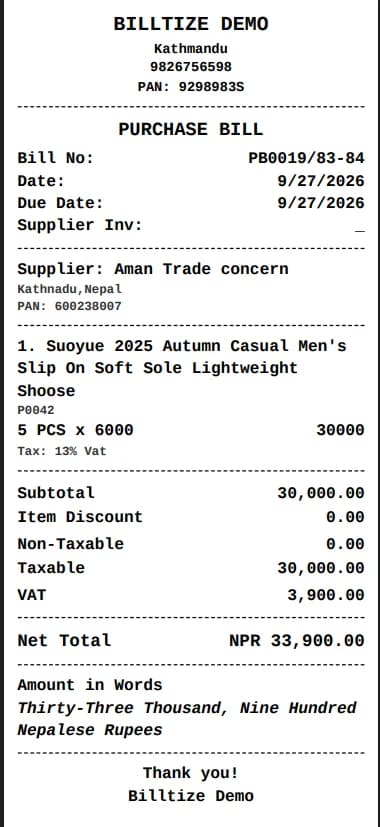
Fast Thermal Receipt & Barcode Slip
Speed up counter checkouts with 58mm and 80mm thermal receipt printing.
Generate formatted thermal receipt slips complete with business header, itemized rates, discounts, applicable taxes, and customer payment details. Compatible with standard USB and Bluetooth thermal POS printers.
POS Features for Everyday Sales Operations
Practical capabilities built to streamline sales recording, inventory connection, and customer billing.
Barcode and Product Billing
Process product sales using available barcode workflows or search for products directly within the system.
Customer Payments
Record customer payments and maintain payment and outstanding-balance information within the billing workflow.
Credit Notes & Sales Returns
Use credit notes to record supported sales adjustments and customer returns with proper documentation.
Inventory Connection
Connect sales activity with Billtize inventory management so that product and stock information can be managed alongside sales transactions.
Receipt & Invoice Printing
Print supported receipts and invoices using compatible printing hardware available to the business.
Barcode Label Printing
Generate and print product labels where supported by the Billtize workflow and compatible hardware.
User & Cashier Permissions
Use role-based permissions to control access for different users and sales staff.
Multiple Companies & Warehouses
Manage supported companies and warehouses from the Billtize platform.
Connect POS With Billing, Inventory and Accounting
A POS system becomes more useful when sales information does not remain isolated at the checkout counter. Billtize brings related business operations into one platform:
POS Sale
Scan or search items at the checkout counter and process customer purchase.
Billing
Create invoices, print receipts, and record customer payment settlements.
Inventory
Sales connect with designated warehouse stock levels and product catalogs.
Accounting
Transactions connect with double-entry ledgers, cash/bank accounts, and receivables.
Reports
View sales registers, gross margins, and business financial statements.
The exact data flow should be presented according to the application's implemented workflow. This connected approach can reduce duplicate data entry and give businesses a more consistent way to manage sales, stock, financial records, and reports.
POS and Billing Software in Nepal
POS and billing are closely related, but they serve different parts of the sales process. A POS system is commonly used at the point where a customer purchase is recorded. Billing software can provide broader invoice, payment, credit-note, and customer-balance management. Billtize combines these business operations within one platform instead of requiring businesses to maintain completely separate systems.
POS and Inventory Management
Retail sales are directly connected to products and stock. When POS and inventory are managed through the same business platform, businesses can work with sales and inventory information without maintaining completely separate systems. Billtize provides inventory features including product management, categories, units, warehouse management, stock transfers, batch and expiry tracking, and product profitability reporting.
POS and Accounting
Sales data is also connected to financial management. Billtize includes double-entry accounting, chart of accounts, ledgers, journal vouchers, bank and cash management, and financial reports including Trial Balance, Income Statement, and Balance Sheet. The POS page describes the connection between sales and accounting without claiming automatic ledger posting unless the code/product behavior confirms it.
POS and IRD / CBMS
Businesses in Nepal may also need billing workflows connected with IRD and CBMS functionality. Billtize provides IRD/CBMS functionality as part of its business platform. Detailed IRD, VAT, CBMS, and tax-related information should remain on the dedicated IRD E-Billing page so that the POS page does not duplicate that topic.
POS Hardware and Printing
POS software works alongside physical hardware used at the sales counter. Depending on your business setup and verified compatibility, Billtize workflows work with standard POS hardware:
1D Barcode Scanners
Handheld 1D barcode scanners for standard retail product code lookups.
2D Table Top Scanners
Omnidirectional tabletop scanners for rapid hands-free counter scanning.
58mm & 80mm Thermal Printers
Standard thermal receipt printers for quick customer sales slips.
Barcode Label Printers
Thermal label printers for shelf price stickers and carton barcodes.
POS Software vs Separate Business Systems
Evaluating standalone POS tools against an integrated business platform. This table describes actual Billtize capabilities, not hypothetical advantages.
| Capability | Separate Systems | Billtize |
|---|---|---|
| POS Sales | Managed separately at checkout with disconnected records. | Part of connected business operations in one platform. |
| Billing | Separate billing workflow and redundant invoice typing required. | Connected within the platform for invoices, cash sales, and credit. |
| Inventory | Requires a separate stock system or end-of-day manual counts. | Connected inventory management across designated warehouses. |
| Accounting | Requires manual journal entries and separate accounting software. | Connected double-entry accounting and general ledgers. |
| Reporting | Data must be manually combined from multiple software tools. | Business information and financial reports available from one platform. |
| Users | Fragmented logins with inconsistent user access controls. | Role-based user permissions for cashiers, accountants, and owners. |
| Warehouses | Limited or absent multi-location inventory support. | Multiple warehouse support for central godowns and retail stores. |
What to Look for in POS Software in Nepal
Before choosing a POS system, businesses should check these key evaluation points:
Does it support the barcode scanners used by your business?
Does it work with your receipt and invoice printers?
Can it manage products and inventory?
Can it record customer payments and outstanding balances?
Can it handle credit notes or supported sales returns?
Can it connect sales information with accounting?
Can users and cashiers have different permissions?
Can it support the warehouses and companies your business needs?
Does it provide the reports required by your business?
Does it provide the IRD/CBMS functionality your billing workflow requires?
What is included in the POS software price?
Can your existing business data be migrated?
POS vs Billing vs Accounting vs Inventory
Understanding how each module addresses a distinct aspect of business operations.
POS Software
Focused on recording sales at the point of purchase and supporting checkout operations.
Billing Software
Focused on invoices, sales records, payments, credit notes, and customer balances.
Inventory Management
Focused on products, stock levels, warehouses, transfers, batches, expiry, and reports.
Accounting Software
Focused on financial records, double-entry accounting, ledgers, journals, and reports.
Billtize
Billtize brings these connected business functions together within one cloud-based platform.
Who Can Use POS Software?
POS software can be useful for businesses that regularly record product or service sales at a counter or other point of purchase. Depending on actual Billtize workflows, suitable business types include:
- Retail businesses & grocery stores: Counter sales, barcode scanning, and instant receipt printing.
- Retail shops & department stores: Managing items, customer settlements, and daily sales cash registers.
- Wholesalers & counter traders: Processing quick cash or credit counter sales alongside wholesale orders.
- Distributors: Counter dispatches and showroom sales connected with central inventory.
Cloud-Based POS Software in Nepal
A cloud-based POS platform allows business information to be managed through an online system rather than keeping the entire workflow dependent on a single local computer.
Billtize operates as a cloud-based business platform combining sales, billing, inventory, accounting, reporting, and other business functions. Business owners can review sales activity and stock levels from any browser.
POS Software Price in Nepal
Billtize offers a 30-day free trial and paid plans that include the platform's available business management features. The pricing page remains the source of truth for current prices, billing periods, taxes, and included features.
View Billtize PricingBuilt for Businesses in Nepal
Billtize is a cloud-based business platform for businesses in Nepal, bringing billing, inventory, accounting, reporting, and related business operations together.
Support & Onboarding
Direct phone and online support in Nepali and English to help businesses set up products, printers, and billing workflows.
Security Controls & Backups
SSL encryption, automated daily cloud backups, and secure server hosting to keep sales data protected.
User Permissions
Role-based access controls for cashiers, sales representatives, accountants, and administrators.
Frequently Asked Questions About POS Software in Nepal
Clear answers to common questions about point of sale, hardware compatibility, and connected operations.