IRD E-Billing Software in Nepal
Manage business billing with IRD and CBMS functionality in Billtize. Create invoices, maintain sales records, and connect billing with accounting, inventory, and reporting through one cloud-based business platform.
CBMS-Connected Workflow
Connect your electronic billing with the Inland Revenue Department CBMS server for sales synchronization.
Tax Invoicing & VAT
Issue formatted electronic bills with customer PAN, line items, discounts, and real-time 13% VAT calculation.
Annex 13 & Tax Books
Generate official Sales Registers, Purchase Registers, and Annex 13 reports ready for tax audit reviews.
Connected Operations
E-billing connects directly with warehouse inventory deductions, customer payments, and accounting ledgers.
What Is IRD E-Billing Software?
IRD e-billing software is business billing software designed to support electronic invoicing and billing workflows associated with Nepal's Inland Revenue Department (IRD) and applicable electronic billing systems. It enables businesses to issue electronic sales invoices, track credit notes, maintain auditable transaction records, and format reports in accordance with local tax standards.
What Is CBMS?
CBMS stands for Central Billing Monitoring System. It is an Inland Revenue Department system used in Nepal's electronic billing environment to receive and monitor billing information through supported electronic billing systems.
The system provides a centralized digital channel through which verified software applications can communicate sales data, invoice numbers, tax amounts, and credit returns. This description serves as an informational overview of the technology infrastructure rather than legal advice. Businesses should consult official IRD directives or a qualified tax professional regarding specific regulatory criteria applicable to their turnover and business structure.
Why Use IRD-Connected Billing Software?
Modern enterprises in Nepal benefit from billing software that simplifies daily transactions while keeping tax records organized.
Create Electronic Invoices
Generate clean, compliant invoices with line items, tax breakdowns, and customer PAN records.
Maintain Sales Records
Preserve an unalterable, sequential sales audit trail for regulatory and internal verification.
Track Customer Payments
Record partial payments, multiple settlement methods, and outstanding customer balances.
Manage Credit Notes
Process customer sales returns with formal credit notes that update stock and VAT ledgers.
Connect With Inventory
Invoices deduct stock across assigned godowns and branches in real time to prevent overselling.
Connect With Accounting
Billing figures automatically flow into double-entry ledger accounts without manual duplication.
Organize Tax Reports
Extract instant VAT summaries, Annex 13 registers, and sales books ready for audits.
Support CBMS Workflows
Utilize verified IRD/CBMS billing integration designed for registered taxpayers in Nepal.
Billtize IRD E-Billing at a Glance
Core platform attributes and e-billing specifications for businesses in Nepal.
Electronic Billing
Manage electronic billing through the Billtize billing workflow.
IRD / CBMS
Use Billtize's verified IRD/CBMS functionality for sales synchronization.
Sales Records
Manage sales information and transaction history alongside daily billing.
Customer Payments
Track supported customer payment information, partial dues, and settlements.
Credit Notes
Manage supported credit-note workflows for returns and sales adjustments.
Accounting
Connect billing with Billtize's double-entry accounting functions.
Inventory
Connect billing and sales operations with real-time inventory management.
Reporting
Access available business, tax registers, and financial intelligence reports.
IRD E-Billing Features for Businesses in Nepal
Essential electronic billing, tax reporting, and platform capabilities.
Electronic Invoicing
Create and manage electronic invoices through Billtize's billing workflow with sequential invoice numbering and customer PAN records.
IRD Billing
Use Billtize's verified IRD-related electronic billing functionality to issue standardized tax receipts and sales documentation.
CBMS Integration
Billtize provides a CBMS-connected billing workflow. Configure your IRD credentials in settings to transmit approved invoices to the CBMS server.
Sales Information
Maintain organized, filterable sales records within the billing workflow for management oversight and financial reporting.
Customer Payments
Manage supported customer payment records, partial settlements, bank transfers, and receivables ageing from a single view.
Credit Notes
Manage supported credit-note transactions for merchandise returns, automatically synchronizing tax books and inventory.
Accounting Connection
Connect billing directly with Billtize's double-entry accounting ledger entries, Journal Vouchers, and Trial Balance.
Inventory Connection
Connect billing and sales with warehouse inventory, adjusting stock across branches and tracking batch/expiry details.
BS Dates & Fiscal Years
Native Bikram Sambat date selector across all invoices and reporting periods aligned with Nepali fiscal calendar years.
How IRD E-Billing Works With Billtize
A transparent, step-by-step process from invoice issuance to government synchronization and financial reporting.
Create Invoice
Enter line items, select customer PAN, and apply trade discounts.
Billtize Billing
Sequential bill number is assigned and saved to company sales records.
CBMS API Workflow
Configured credentials transmit approved bills to the IRD CBMS server.
Submission & Status
View confirmation status in the dashboard with one-click retry if a sync fails.
Business Records
Sales Book, Annex 13, and accounting ledgers update automatically.
Connecting IRD E-Billing to Daily Billing
IRD/CBMS-related billing is part of Billtize's broader business platform rather than requiring businesses to maintain completely separate billing and business-management systems. In many companies, tax compliance is treated as a cumbersome secondary chore where invoices must be manually re-entered into separate tax filing software.
Billtize combines daily billing operations with related sales, customer payment, inventory, accounting and reporting functions. Billtize's IRD/CBMS functionality operates alongside its core billing workflow, rather than being presented as a completely separate product.
One Unified Commercial Core
- Single Entry Point: Issue invoices from sales counters or offices; data directly drives both tax reporting and commercial records.
- Audit Trails: Every transaction maintains immutable records of invoice numbers, issuance dates, customer PAN, and VAT.
- No Third-Party Bridges: Avoid third-party sync connectors that break during software updates or schema changes.
Double-Entry Financial Architecture
Billing records link directly to financial statements without manual journal preparation:
Connect IRD Billing With Accounting
Billtize combines billing and accounting within the same platform. Invoices, sales returns, and customer settlements are immediately reflected in your general ledgers, bank and cash accounts, and financial reports.
This tight connection eliminates discrepancies between tax sales totals and internal accounting profit-and-loss reports, giving your management and audit teams dependable financial figures.
Connect Billing With Inventory
Billing and inventory operate together in Billtize. When an electronic invoice or counter bill is finalized, product quantities deduct from designated warehouses or store locations in real time.
Manage items, categories, packaging units of measurement (UoM), warehouses, stock transfers, batch and expiry dates, and analyze product profitability based on true landed costs.
Multi-Warehouse Inventory Controls
- Warehouse Allocations: Dispatch goods from central godowns or retail counters directly from invoices.
- Batch & Expiry: Track manufacturing dates and expiration on invoices for pharmaceutical and food lines.
- Stock Valuation: Real-time cost of goods sold (COGS) updates aligned with tax reporting books.
Point-of-Sale Hardware Compatibility
Counter sales checkout integrates with certified billing workflows:
IRD E-Billing With POS
Businesses using POS can connect their sales workflow with billing and the available IRD/CBMS functionality within the broader Billtize platform.
Counter staff can rapidly scan items, print itemized thermal receipts with tax amounts, and record cash or digital payments, while the underlying transactions enter your business sales registers and accounting ledger.
VAT and Business Reports
Billtize provides reporting tools that help organize VAT, sales and purchase information for audit preparation.
VAT Summary
Consolidated overview of taxable sales, non-taxable revenue, output VAT, and input tax credits.
Sales Register (Sales Book)
Detailed chronologically sequenced sales register containing invoice numbers, customer PAN, and tax amounts.
Purchase Register (Purchase Book)
Vendor purchase bill records with supplier PAN and input VAT breakdown for monthly reconciliations.
Annex 13 Report
Official Annex 13 format report generated directly from verified transaction data when required.
Credit Notes & Returns Register
Audit list of all issued credit notes, customer adjustments, and stock write-backs.
Excel Export
Export all tax registers and sales books to Excel spreadsheets for external audit and review.
BS Dates and Nepali Fiscal Years
Billtize features native support for Bikram Sambat (BS) dates and Nepali fiscal year cycles (such as 2080/81 and 2081/82). Date filters, invoice headers, and audit registers display BS calendar formatting naturally.
- Dual BS and AD calendar support across invoice creation
- Fiscal year quarters aligned with Nepal tax submission windows
Review Billing Submission Status
Billtize includes submission status tracking for CBMS communication. The dashboard records the transmission state of each bill, alerting operators if a network interruption causes a synchronization failure.
- Real-time submission confirmation flags on invoice records
- One-click retry functionality to resend failed transactions
See Billtize IRD E-Billing in Action
Interactive interface walkthrough showing real electronic invoices, VAT calculations, and tax books.
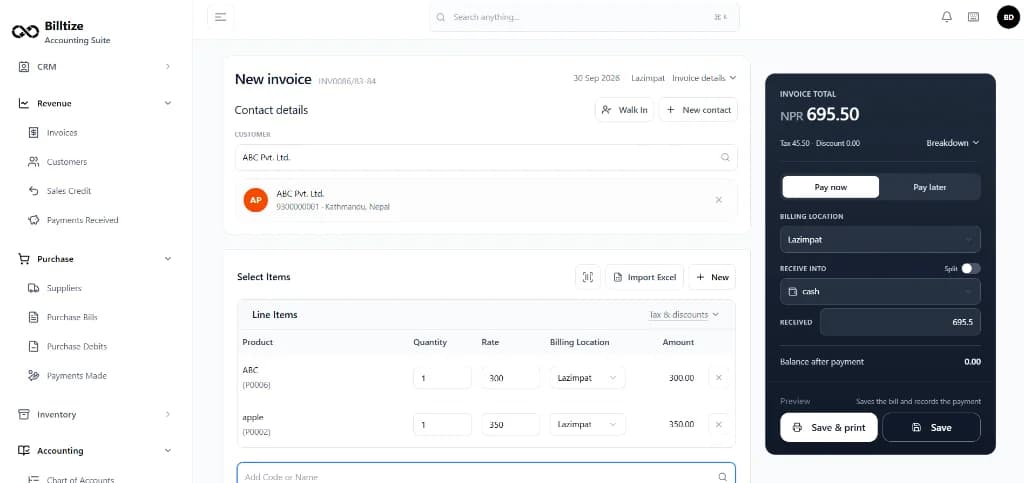
Compliant Electronic Invoices
Generate electronic invoices with customer PAN, item breakdown, and automatic 13% VAT calculation.
Create electronic sales bills tailored to Nepal tax requirements. Billtize computes taxable amounts, non-taxable lines, discounts, and real-time VAT with sequential bill numbering.
Built for Businesses in Nepal
Trusted by commercial enterprises across Kathmandu, Pokhara, Biratnagar, and throughout Nepal.
Secure Business Billing Data
Enterprise security practices protecting critical invoicing records, tax books, and financial transactions.
Encryption in Transit
All traffic between your browser and Billtize servers uses modern TLS/HTTPS encryption standards.
Role-Based Permissions
Control employee access rights so operators only view and edit modules relevant to their role.
Automated Cloud Backups
Redundant daily database backups ensure business billing data is safeguarded against local hardware failure.
IRD E-Billing vs Standard Billing Software
Understand the operational differences between standalone billing systems and connected IRD billing.
| Capability | Standard Billing Software | IRD / CBMS-Connected Billing |
|---|---|---|
| Electronic Invoicing | Basic printable invoice templates without verified IRD formatting | Standardized electronic invoices with PAN, BS dates, and sequential numbering |
| Sales Records | Standalone transaction log stored in disconnected spreadsheets | Integrated sales ledger synchronized with customer payment history |
| Customer Payments | Manual payment tracking often requiring separate bookkeeping entries | Unified settlement records with partial payments and ledger synchronization |
| Credit Notes & Returns | Manual adjustments with risk of inventory and tax register discrepancies | Audited credit notes that automatically adjust stock counts and VAT books |
| IRD / CBMS Workflow | No integration; requires manual re-entry into tax portals | CBMS-connected billing workflow with submission status and retry options |
| Accounting Connection | Disconnected; invoices must be manually re-entered into accounting software | Direct double-entry ledger posting, Journal Vouchers, and Trial Balance sync |
| Inventory Connection | Sales do not adjust stock automatically across warehouses | Real-time stock deduction across designated godowns, branches, and counters |
| Business Reporting | Basic sales totals without standardized Nepal VAT or Annex registers | Built-in VAT Summary, Sales Book, Purchase Book, Annex 13, and Excel export |
What to Check When Choosing IRD E-Billing Software in Nepal
An objective informational evaluation checklist for business owners and financial managers.
Does the software provide the IRD/CBMS functionality your business requires?
Verify whether the platform supports verified electronic billing workflows and CBMS communication for Nepal.
Is the electronic billing workflow clearly documented?
Ensure invoice creation, sequential numbering, and submission steps are transparent and auditable.
Can invoices and sales records be managed in one system?
Confirm that billing data directly creates permanent sales registers without manual double-entry.
Can credit notes be managed?
Check whether customer returns generate formal credit notes that update stock and VAT records accurately.
Can customer payments be tracked?
Verify partial payments, cash/bank receipts, and customer receivable ageing are built into billing.
Does billing connect with accounting?
Ensure sales and tax entries post directly to double-entry financial ledgers and financial statements.
Does billing connect with inventory?
Confirm that billing line items automatically reduce warehouse stock and track batch/expiry details.
Are relevant VAT and sales/purchase reports available?
Check for standard VAT Summary reports, Sales Books, Purchase Books, and Annex 13 compatibility.
Can reports be exported?
Verify whether financial and tax reports can be exported to Excel or spreadsheet formats for audit reviews.
Can users have different permissions?
Confirm role-based user controls for billing operators, cashiers, accountants, and administrators.
Is business data backed up?
Ensure cloud encryption, daily backups, and secure session management protect billing data.
Is implementation and support available?
Look for local phone, chat, and email support with onboarding guidance tailored to businesses in Nepal.
What is included in the pricing?
Check whether pricing is transparent and includes unlimited users, software updates, and all core modules.
Can existing data be migrated?
Confirm Excel bulk import capabilities for customer contacts, product catalogs, and opening balances.
Who Can Use IRD E-Billing Software?
Businesses that use electronic billing and need software to support applicable IRD/CBMS billing workflows can evaluate e-billing software based on their operational and regulatory requirements.
Retail Stores
Supermarkets, apparel, electronics, and counter shops.
Wholesale & Trading
Distributors, FMCG dealers, and commercial wholesalers.
Manufacturing
Producers needing batch tracking and finished goods billing.
Service Agencies
Consultancies, IT firms, agencies, and service providers.
Cloud-Based IRD Billing Software
Billtize operates in the cloud, allowing business owners, cashiers, and accountants to securely issue invoices, inspect sales registers, and review accounting reports from any standard modern web browser.
IRD E-Billing Software Price in Nepal
Billtize offers transparent, straightforward subscription plans that include electronic billing, IRD/CBMS functionality, accounting, inventory, and unlimited user accounts without hidden per-invoice fees.
View Billtize PricingStart with a full 30-day free trial · No credit card required
Frequently Asked Questions About IRD E-Billing in Nepal
Clear answers regarding electronic invoicing, CBMS synchronization, and tax reporting in Billtize.
Related Business Solutions in Nepal
Discover Billtize's interconnected modules designed for businesses in Nepal.
Billing Software in Nepal
Create invoices, manage sales billing, track customer receivables, and credit returns.
Accounting Software in Nepal
Double-entry bookkeeping, chart of accounts, ledgers, and financial reports.
Inventory Management in Nepal
Multi-warehouse stock, barcode labels, and batch/expiry tracking.
POS Software in Nepal
Counter checkout, barcode scanners, and thermal receipt printing.