IRD CBMS Compliance in Billtize: Enable and Sync Invoices
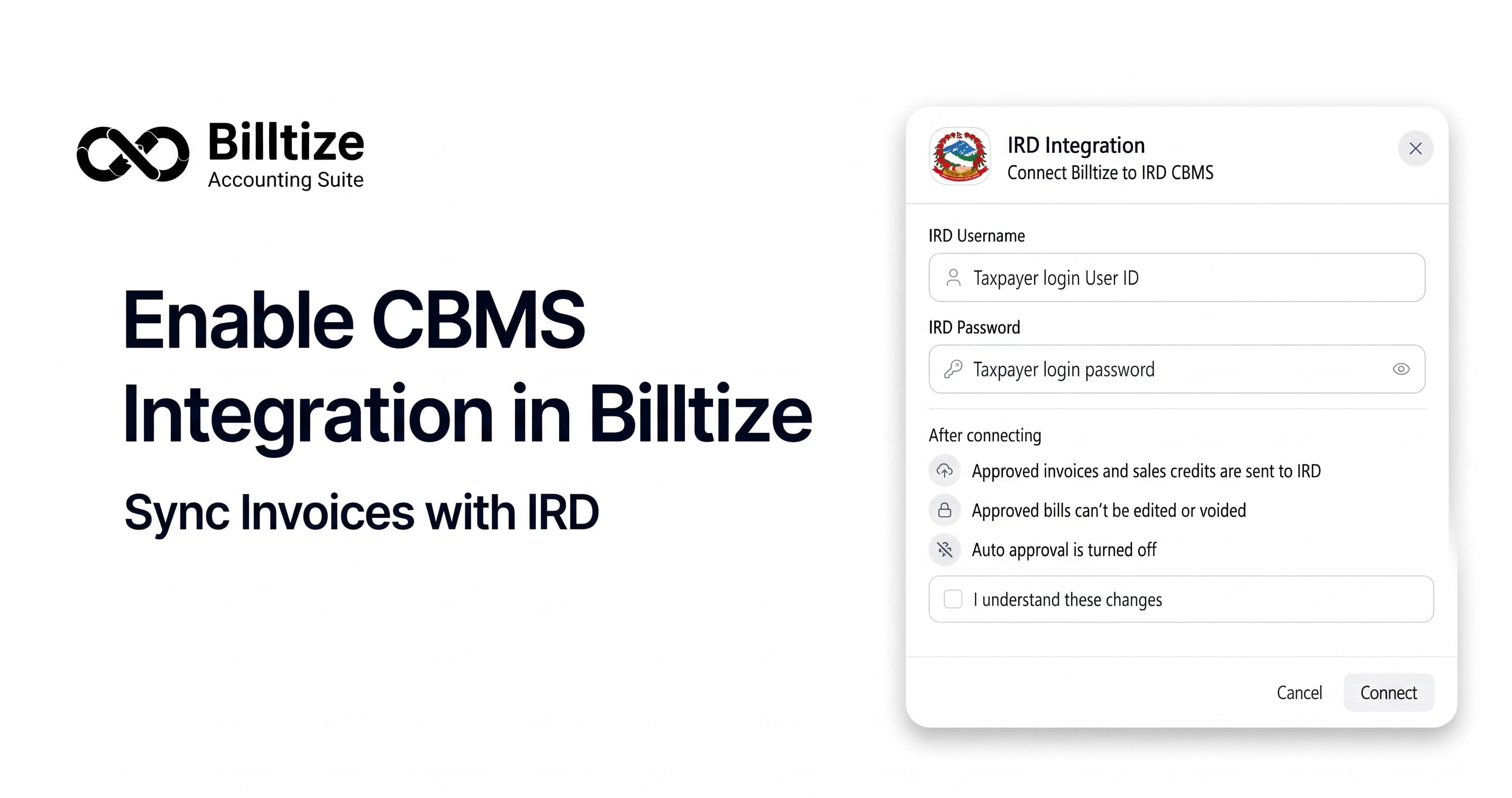
Businesses in Nepal that are required to use the Central Billing Monitoring System must make sure every eligible invoice reaches the Inland Revenue Department (IRD). Uploading invoices by hand is slow, easy to forget, and hard to defend during a tax review.
Billtize comes with built-in IRD synchronization. Approved sales invoices and credit notes are transmitted to CBMS automatically, and the submission status is stored against the document. Once the setup is done, the process runs in the background.
IRD CBMS and statutory compliance, in short
CBMS is not a filing portal. It is a monitoring system: the IRD keeps a copy of the sales documents you issue, so the turnover you declare can be compared with the invoices that actually exist. Your VAT return and Annex 13 still come from your own books, which is why the invoice and the register have to agree.
The obligation is tied to turnover and VAT registration rather than to the software you use. The trigger most businesses cite is annual turnover above NPR 10 crore, and the scope has been widened in stages. Confirm your position with your auditor before you rely on any article, including this one.
Why enable CBMS integration?
- Approved invoices and credit notes are synchronized automatically.
- No manual re-entry into the IRD portal.
- Fewer missed submissions, because every document carries a status.
- Faster reconciliation during a VAT filing or a tax review.
- Approval time and submission time sit on the same record.
How it works inside Billtize
The integration is deliberately simple. There is one connection per organization, one queue per document, and one status per attempt.
- You approve a sales invoice or credit note. The number is assigned at approval and does not change afterwards.
- The document enters the submission queue with the organization's IRD taxpayer login, so a change of accountant does not break the connection.
- CBMS accepts the document and returns a reference, which is stored against the invoice.
- If CBMS rejects it, or the connection is down, the document stays flagged for review and retry instead of disappearing.
What is sent: seller name, PAN or VAT number and address; buyer name and PAN; invoice number, document type, and the date in both Bikram Sambat and AD; line items with quantity, unit, rate and discount; taxable amount, 13% VAT and totals; and for a credit note, the invoice it adjusts.
What is never sent: bank details, purchase invoices, payroll, stock movements and internal notes. CBMS does not ask for them.
Setting up CBMS integration in Billtize
The setup takes a few minutes and is done once per organization.
- Open Settings → Organization → IRD / CBMS. The current connection state is shown here.
- Enter the IRD portal username and password issued to your business, then save.
- Billtize checks the credentials against the portal and reports whether the organization is connected. A failure tells you whether it is a credential problem or a reachability problem.
- Confirm the status shows connected. Approvals now enter the queue automatically.
- Approve one low-value test invoice with a valid buyer PAN and follow it through to an acknowledgement before you rely on the setup for live billing.
Syncing invoices and credit notes with IRD
- Create the invoice with the buyer's name and PAN, the correct items, and the date you actually issued it.
- Approve the invoice. The status moves from approved to submitted.
- Wait for the acknowledgement. The status settles on acknowledged or stays visible with the reason it failed.
- Repeat for credit notes. A credit note must reference the invoice it adjusts so the reduction is traceable to registered sales.
If an invoice fails to synchronize, open the invoice list, filter on sync status, and resubmit the same document once the cause is fixed. Do not create a new invoice for the same sale: that leaves a gap in your numbering and a second attempt for one transaction.
Checking whether an invoice reached IRD
Sign in to the IRD taxpayer portal and open the sales register sync screen. The invoice number and amount should match what Billtize shows. Matching figures on both sides is the only proof that matters. A rejected document keeps the reason CBMS returned, so you know which field to correct.
Statutory reports that use the same records
VAT Summary, Sales Book, Purchase Book and Annex 13 are generated from the approved documents rather than from a separate export. A correction made to fix a CBMS rejection also corrects the report it feeds.
- VAT Summary for the filing period.
- Sales Book, in the same sequence as the submitted invoices.
- Purchase Book and Annex 13 for the input side.
- Bikram Sambat dates and Nepali fiscal years, with Excel export for your auditor.
Common reasons a submission fails
- Buyer PAN missing or incorrect. The most common one. Correct the buyer record and resubmit.
- Duplicate invoice number. Check whether an earlier attempt already succeeded before creating anything new.
- Expired portal credentials. Update them in the IRD / CBMS settings and the queue resumes.
- IRD unavailable. Wait. The document retries when the connection returns.
- Amount or VAT mismatch. Review the lines and the tax treatment, then resubmit.
Frequently asked questions
Does Billtize support IRD CBMS integration?
Yes. Approved invoices and sales credit notes are transmitted to CBMS automatically once the organization's IRD taxpayer login is connected, and the submission status is recorded against each document.
Do I have to upload invoices manually?
No. Approval places the document in the submission queue, and the integration handles transmission and acknowledgement.
How do I know an invoice reached IRD?
Two places agree: the document status in Billtize shows an acknowledgement, and the sales register sync screen in the IRD taxpayer portal shows the invoice number and amount.
What happens if an invoice fails to synchronize?
Billtize flags failed synchronizations so they can be reviewed and retried. Network and IRD outages resolve themselves when the connection returns; data problems need a correction first, then a resubmission of the same document.
Are VAT and Annex 13 reports connected to the submissions?
They come from the same approved records. VAT Summary, Sales Book, Purchase Book and Annex 13 are generated from your documentation, including returns, and can be exported to Excel.
Can I use this for more than one company?
Yes. Each organization keeps its own connection and its own credentials, so multi-company setups never mix submission data between businesses.
Where to go next
CBMS integration is not a switch you flip once; it is a loop that runs every time an invoice is approved. Once the connection is healthy and the first test invoice is acknowledged, compliance becomes a report you read rather than a portal you visit.
To see how electronic billing, statutory reports and accounting ledgers fit together, explore IRD e-billing software in Nepal, review the tax and IRD compliance features, or check pricing and start a free trial.
If you need help configuring CBMS integration or have questions about any Billtize feature, our team is available on +9779826756598.
This article is general information about how CBMS integration works in Billtize, not tax advice. Confirm current thresholds, filing obligations and directive requirements with your auditor or a licensed practitioner.